Automating a Monobank jar total without the API
Hello! I want to share a simple way to read the amount raised in a Monobank jar and feed it into your own site, a chatbot or any other service.
This came up when I could not find a decent way of doing it through the Monobank API. They do have a webhook that is meant to send you the total every time the jar takes a payment, but I never got it working. Maybe I misunderstood something, maybe I rushed, maybe there were problems on the server — but registering the listener simply failed. I wrote to Monobank support and got a reply a full day later, and it came down to “read the docs, it is all in there”. While I was waiting I put together another solution: not elegant, and pretty blunt about it, but it works and it does what I needed 🙂
The idea
The idea itself is simple — parse the jar page directly. I was worried Monobank might generate CSS class names on the fly to make scraping harder, but happily every class is static, so the whole thing is very straightforward.
The plan
- Write a small web service in Python that takes a request with the Monobank jar page identifier, parses the page and returns the results as JSON.
- On the hosting side, write a PHP script that cron calls every 30 minutes to query the web service. It saves whatever comes back to a database or a file for later use. But that part is up to you, whatever is convenient
Why cron and an intermediate store?
Why run it from cron and keep the value in a store of my own, rather than calling the service every time someone opens the site? So that I do not accidentally start hammering the Monobank page with a request on every single visit. There is no need to create load for nothing. Refreshing the figure once every half hour, or even once an hour, is perfectly good enough for a copy of the number, and it keeps the site up to date without putting a strain on anything.
What you will need
- A basic VPS to run the service on. I use a cheap one with 1 GB of RAM, 1 CPU and a 20 GB disk;
- Flask for the web service;
- Selenium and Chrome WebDriver to parse the page.
How it works
The Flask service takes a GET request with the Monobank jar identifier and a token. The token keeps stray bots and uninvited guests away from the service. Just for the example, I have written the token straight into the code.
What comes back is JSON with the organisation name, the name of the fundraiser and the amount collected. You can pull out extra fields as well if you want to.
The jar identifier is right here:
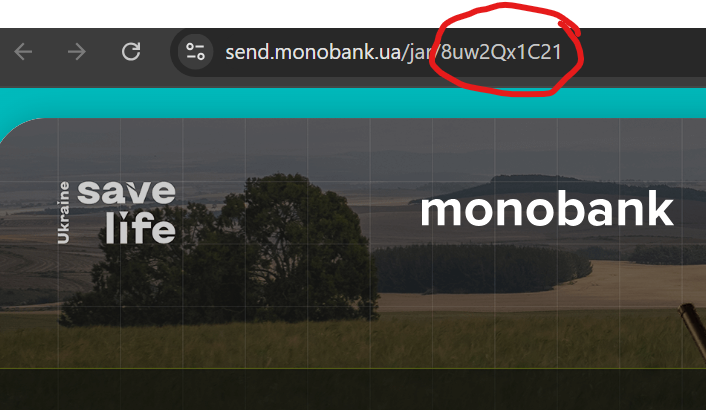
The Flask service code:
from flask import Flask, request, jsonify
from selenium import webdriver
from selenium.webdriver.chrome.service import Service
from selenium.webdriver.chrome.options import Options
from selenium.webdriver.common.by import By
from selenium.webdriver.support.ui import WebDriverWait
from selenium.webdriver.support import expected_conditions as EC
import re

app = Flask(__name__)
app.config['JSON_AS_ASCII'] = False
ACCESS_TOKEN = "YOUR_TOKEN_HERE"

def get_jar_data(account_code):
    chrome_options = Options()
    chrome_options.add_argument("--headless")
    chrome_options.add_argument("--no-sandbox")
    chrome_options.add_argument("--disable-dev-shm-usage")
    service = Service("/usr/local/bin/chromedriver")
    driver = webdriver.Chrome(service=service, options=chrome_options)

    try:
        driver.get(f'https://send.monobank.ua/jar/{account_code}')
        wait = WebDriverWait(driver, 20)

        amount = wait.until(EC.visibility_of_element_located((By.CSS_SELECTOR, '.stats-data-value'))).text
        name = wait.until(EC.visibility_of_element_located((By.CSS_SELECTOR, 'div.field.name h1'))).text
        owner_info = wait.until(EC.visibility_of_element_located((By.CSS_SELECTOR, 'div.field.jarOwnerInfo span'))).text
        clean_amount = re.sub(r'[^d.,]', '', amount)

        return {"name": name, "owner_info": owner_info, "balance": clean_amount}

    except Exception as e:
        return {"error": f"Error: {e}"}

    finally:
        driver.quit()

@app.route('/get_balance', methods=['GET'])
def get_jar_data_route():
    account_code = request.args.get('account_code')
    access_token = request.args.get('access_token')

    if not account_code or not access_token:
        return jsonify({"error": "Error account_code и access_token"}), 400
    if access_token != ACCESS_TOKEN:
        return jsonify({"error": "Wrong Token"}), 403

    data = get_jar_data(account_code)
    return jsonify(data), (500 if "error" in data else 200)

if __name__ == '__main__':
    app.run(host='0.0.0.0', port=5000)


Code language: Python (python)
And here is the response you get:
{
“balance”: “20214”,
“name”: “РЕБ для саперів 68 батальйону ТРО”,
“owner_info”: “БФ ”СЕЙВ ЮКРЕЙН ЛАЙФ” created a fundraiser”
}Code language: JSON / JSON with Comments (json)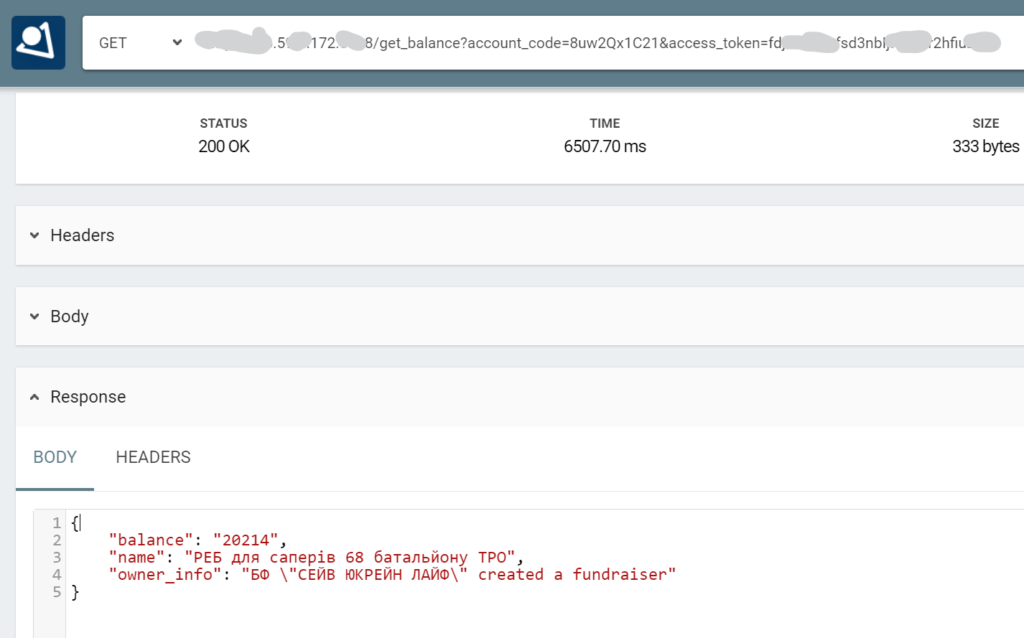
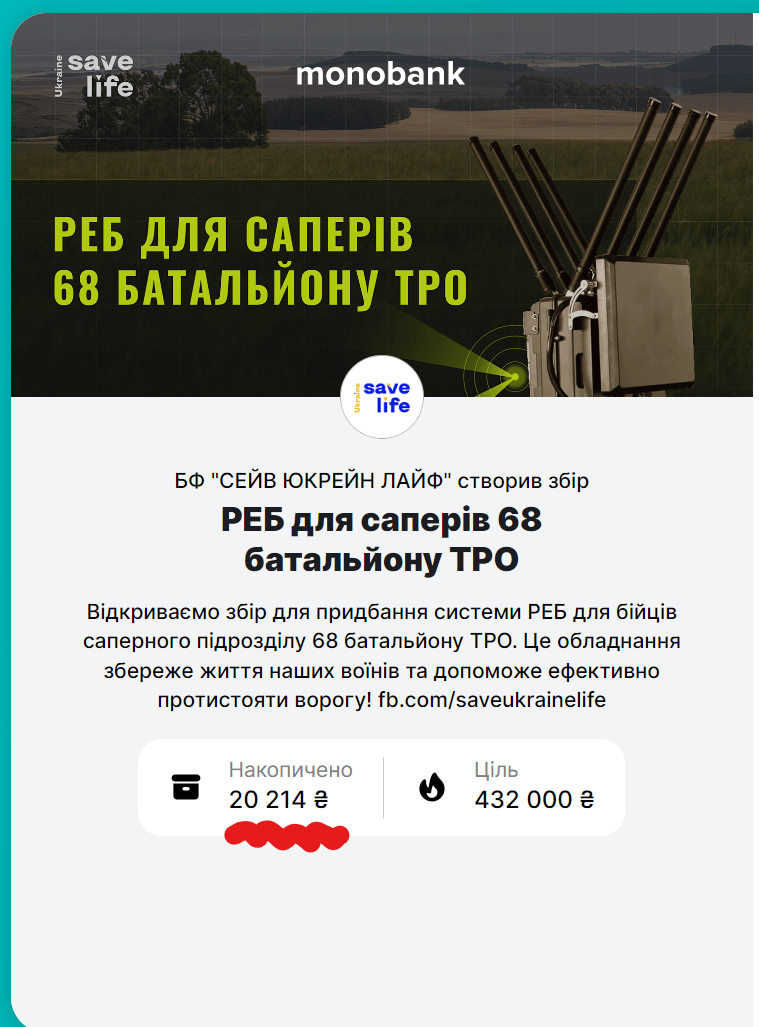
And it matches the figure shown on the page:
The PHP script for cron
I run this script from cron every 30 minutes. In this example it saves the result to a JSON file:
<?php
$url = ‘http://YOUR_SERVER_IP:PORT/get_balance?account_code=YOUR_ACCOUNT_CODE&access_token=YOUR_ACCESS_TOKEN’;

$ch = curl_init();
curl_setopt_array($ch, [
CURLOPT_URL => $url,
CURLOPT_RETURNTRANSFER => true,
CURLOPT_CONNECTTIMEOUT => 60,
CURLOPT_TIMEOUT => 120,
CURLOPT_FAILONERROR => true,
CURLOPT_SSL_VERIFYPEER => false,
CURLOPT_SSL_VERIFYHOST => false
]);

$response = curl_exec($ch);

if (curl_errno($ch)) {
file_put_contents(‘error_log.txt’, ‘Request error: ‘ . curl_error($ch) . “n”, FILE_APPEND);
} elseif (!empty($response)) {
$decoded_response = json_decode($response, true);
if (json_last_error() === JSON_ERROR_NONE) {
file_put_contents(‘curcollect.json’, json_encode($decoded_response, JSON_PRETTY_PRINT));
} else {
file_put_contents(‘error_log.txt’, “JSON decoding error: ” . json_last_error_msg() . “n”, FILE_APPEND);
}
} else {
file_put_contents(‘error_log.txt’, “Empty response from servern”, FILE_APPEND);
}

curl_close($ch);
?>
Code language: HTML, XML (xml)
I hope this was useful! You can see it working at the links below.
A reminder: there is a fundraiser running right now for electronic warfare kit for our soldiers, and your support really matters:
Fundraiser page on the site: https://save-ukraine.life/ua_fundraising/reb-dlia-saperiv-68-batalyonu-tro/
Monobank jar for the fundraiser: https://send.monobank.ua/jar/8uw2Qx1C21
